
SWIFT to a ready-to-review entry
Import a supported MT103 or bank-rendered ISO 20022 transfer document. Amount, currency, parties and reference fill the form for you to check and save.
Client balances, commissions and payment records — together in TallyPro for iPhone. Share a link and let your client confirm receipt.
iPhone app · App Store release coming soon
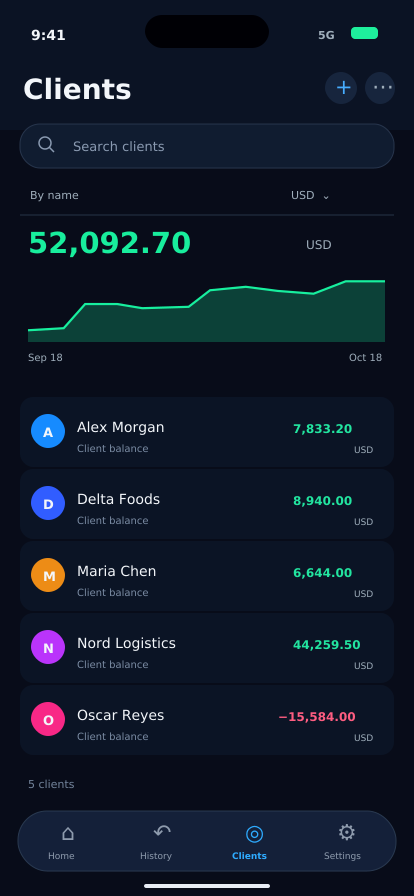
Interface illustrations with sample data in USD.
A client opens your link and confirms receipt in their browser. No app installation or account is needed. You can check the status in TallyPro.
Use the bright share button in the operation.
Opening a link alone does not confirm receipt.
See the response in the operation’s history.
Awaiting confirmation
Demo only. No data is sent and no real receipt is created.
A recipient acknowledgement, not a bank receipt. It records an action by the link holder, does not verify identity and does not transfer money. Share the link only with the intended recipient.
Follow the numbers, understand the balance and keep the supporting details together.
Import a supported MT103 or bank-rendered ISO 20022 transfer document. Amount, currency, parties and reference fill the form for you to check and save.
Create a PDF invoice from an order or imported invoice. Review line items, company and bank details, then share.
Share company and receiving-account details as a clean PDF or text. Select one currency or all accounts and preview before sending.
A separate balance for each client and currency, with a searchable operation history.
Record commissions alongside the operation and see the result in your ledger.
Configure partner shares and track partner payouts.
Organise company accounts and transfers. Upload supported PDF/CSV bank statements to check balances and find unmatched transactions.
Keep company documents together, track expiry dates and prepare a selected document pack for a bank.
Client statements and detailed internal reports for a chosen period. Save and share as PDF or Excel.
Debt reminders, client and total-balance widgets, plus expected payments in Dynamic Island.
Use Face ID or a passcode and save a backup to iCloud or a file.
Find an operation by amount, company or note. Scan a business card to create a client. Restore a full backup or a single client.
Document import prepares a draft for your review. It does not connect to a bank, execute a SWIFT transfer or verify that a payment settled. Recognition depends on the document format and legibility.
Choose a period, prepare the right report and share it as PDF or Excel. Bring in a bank statement to check your company account against your records.
One client, their transactions and balance. Your internal income stays out of the client statement. Save the file or send it straight from the app.
01–18 Oct 2026
Go deeper into transactions, balances and income for one client or all clients. Set your dates and export PDF or Excel for your own review.
Commission income
$1,295.00 USDUpload a supported PDF or CSV bank statement. Compare its closing balance and transactions with the selected company account in TallyPro. See unmatched entries on either side, then review a prefilled form to add a missing transaction.
Illustrative data. Reports export to PDF and Excel; supported bank statements import as PDF or CSV. Invoice import supports readable Word, PDF, scans and photos.
A closer look at what TallyPro actually does.
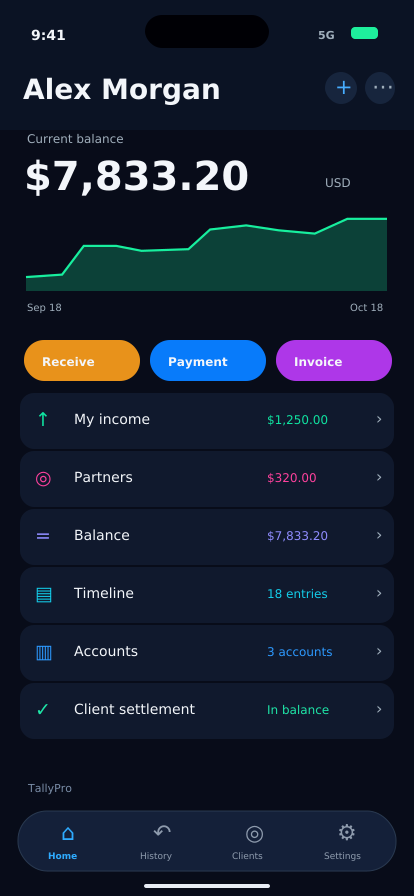
Add and archive clients; keep contacts and opening balances; view each client or all clients; filter by currency and period; search by text or voice; edit, repeat or remove operations; see totals and balance movement.
Set client commission terms; view your commission income by month and currency; assign partner shares and record payouts; distinguish client balances from your own income and partner earnings.
Group accounts by company, bank and currency; record transfers between your company accounts; review account history and reconcile a stated balance. Import supported bank-details documents, review the holder, account and SWIFT/BIC, and share selected details as PDF or text. Upload a supported PDF or CSV bank statement. Compare its closing balance and transactions with the selected company account in TallyPro. See unmatched entries on either side, then review a prefilled form to add a missing transaction.
Read supported Word orders, PDF invoices, scans or photos. Edit invoice number, date, line items, seller, buyer and bank details; optionally add your signature and stamp; preview the PDF and share it. Previously created invoices remain in the invoice history. SWIFT MT103 and supported printed ISO 20022 messages open a prefilled operation for review before saving.
One client, their transactions and balance. Your internal income stays out of the client statement. Save the file or send it straight from the app. Go deeper into transactions, balances and income for one client or all clients. Set your dates and export PDF or Excel for your own review.
Keep company documents, expiry dates and document reminders; export a selected bank document pack. Scan business cards. Use light or dark appearance and six interface languages. Protect access with Face ID or a passcode. Make password-protected backups, restore everything or one client, and manage archived clients. Pro also includes alternate app icons.
A built-in assistant for drafting replies to bank requests, with the transaction and document text you choose. Planned connections: Claude API and OpenAI API. You review and edit the draft before using it.
In development; not included in the current public release or its paid features. Availability and access terms will be announced at launch. Sending data to the selected AI provider will require a separate explanation and your permission.
Privacy policyFor your first clients and everyday records.
For a growing client base and deeper reporting.
Everything in Basic, plus:
Prices, renewal terms and any trial eligibility are shown in the app before purchase. Subscriptions renew automatically unless cancelled in your Apple account settings.
Your main ledger stays on your device. When you create a receipt link, selected operation details are sent to our confirmation service. The privacy policy explains each case.
Privacy policyNo. A receipt link opens in a browser without an account. Only an explicit confirmation changes the status.
Yes. Press and hold the receipt status in the operation history and choose revoke. Editing or deleting an operation alone does not revoke a previously shared link.
Existing records remain readable. Ordinary operation editing and full backups remain available. Pro features require an active subscription.
The public version records your operations and receipt acknowledgements. It does not execute payments or verify settlement through a bank.